Ko-fi or Buy Me a Coffee Link Not Working from Instagram? Why Tips Stall
Short answer
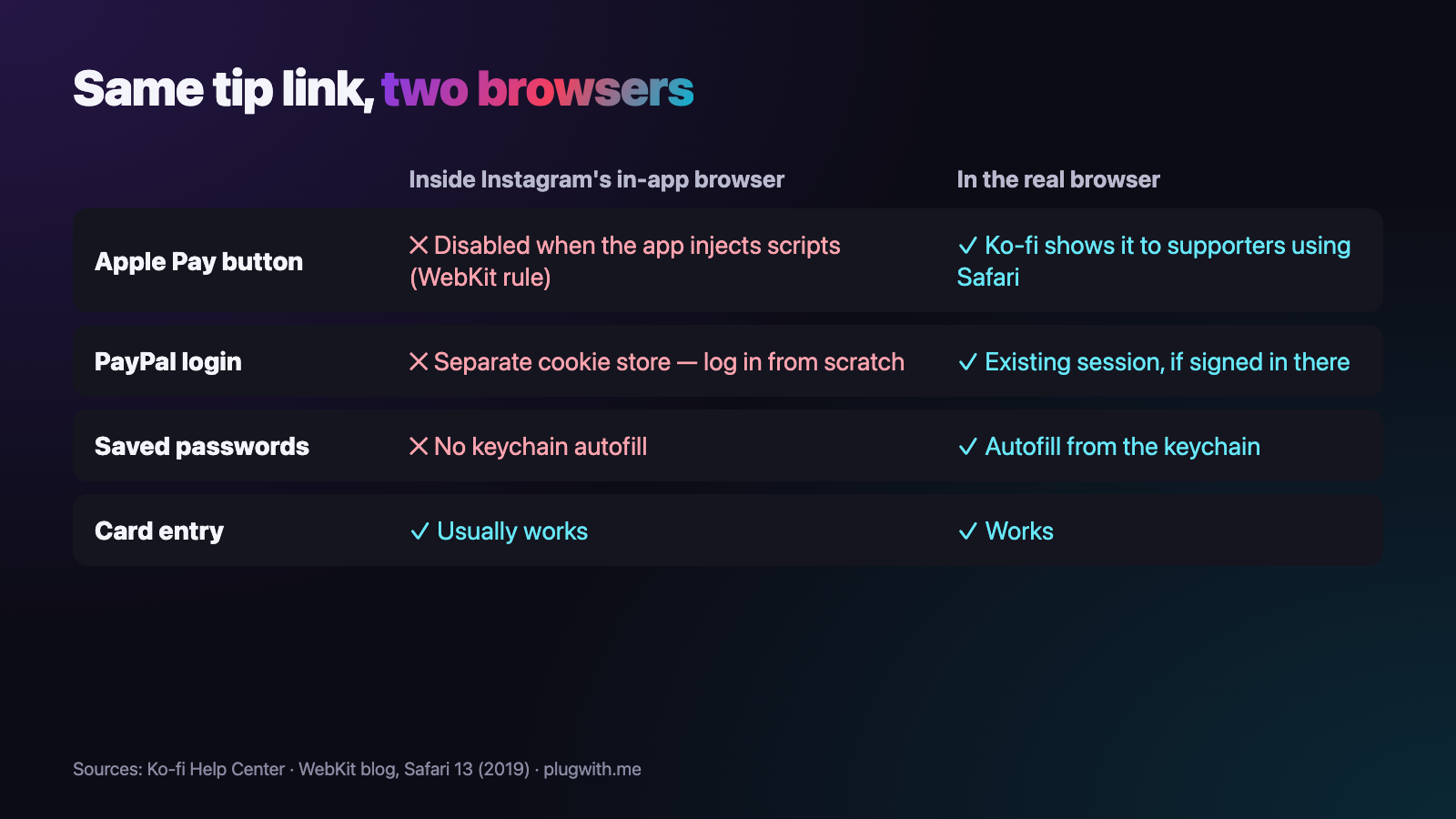
Instagram opens your Ko-fi or Buy Me a Coffee link in its own in-app browser, not in Safari. Ko-fi documents its Apple Pay button for supporters using Safari, WebKit switches Apple Pay off in web views that inject scripts, and the in-app browser has its own cookie store — so fans often see no wallet button and have to log in to PayPal from scratch.
A fan watches your stream clip, taps the link in your bio, picks the coffee-sized tip — and then nothing happens that feels like paying. No Apple Pay button, a PayPal login they don't remember the password for, a card form they would have to type out on a bus. They close it. You see a click and no tip, and you never hear why.
Why does my Ko-fi or Buy Me a Coffee link work in Safari but not from Instagram?
Because a tap in Instagram does not open Safari. Instagram loads your link in its own in-app browser, a web view inside the app with its own storage and its own rules. Your tip page loads fine there; the parts that make paying quick are the ones that go missing.
You never notice, because you test the way nobody else visits: by pasting the link into Safari, where you are signed in to everything.
Why is the Apple Pay button missing inside Instagram?
Because Ko-fi shows it for Safari, and Instagram is not Safari. Ko-fi's help centre says the Apple Pay option appears once a Stripe account is connected, "to all supporters using Safari on an Apple device", and that the payment methods shown depend on, among other things, the supporter's browser and device.
There is also a platform rule behind it. When Apple brought Apple Pay to WKWebView in iOS 13, WebKit wrote that Apple Pay cannot be used alongside script-injection APIs: if the app injects scripts into the page first, Apple Pay is disabled. A 2022 analysis by the developer Felix Krause found that Instagram's iOS app injects JavaScript into the websites it opens; Meta told him the script is used to aggregate events. We have not re-measured that ourselves, so take it as the most likely explanation, not a guarantee for every app version.
Buy Me a Coffee lists all major cards, Apple Pay, Google Pay and Cash App (in supported regions) and advertises a one-tap checkout. The one tap is the wallet button. If the wallet is unavailable, the one-tap checkout becomes a form: typing in a card by hand usually still works, it is just the slow way on a phone.
Why do supporters who pay with PayPal have to log in again?
Because the in-app browser has an isolated cookie store. Your fan may have been signed in to PayPal in Safari for years; inside Instagram, PayPal has never seen them. Ko-fi's own list of PayPal payment methods starts with the supporter logging in to PayPal — and inside the web view they do that from zero.
It gets worse at the password field. The in-app browser has no access to the phone's keychain, so the saved password does not fill itself in. For a three-euro tip, few people go and look it up.
Why don't my numbers show the tips I'm losing?
Because the click is counted when the page opens — before the missing wallet button, before the PayPal login. A checkout that works and one that stalls produce exactly the same click count.
On your dashboard it looks like people visited and decided not to support you. Often they only decided not to fill in a form.
How do I test my own tip link in two minutes?
Copy the conditions your fans tap under, not yours:
- Use an iPhone with a card in Apple Wallet — your own, or a friend's.
- Open Instagram, go to your profile and tap the link in your bio. Do not paste it into Safari, and do not send it to yourself.
- Pick a tip amount and go to the payment step. Is there an Apple Pay button? If you choose PayPal, are you recognised or asked to log in?
- Then do the same in Safari and compare.
The full routine, including the Android side, is in our checklist for testing your link in bio. For a quick read of the environment itself, open the free WebView test from your own bio: it shows whether you are in an in-app browser and what is missing there.
What can fans do themselves right now?
There is a manual way out. Inside Instagram's in-app browser, the menu in the top corner has an entry along the lines of Open in external browser. It reloads the same page in the real browser, where the wallet and the saved logins are available again.
It works — but it is hidden behind an icon most people never touch, its wording changes between app versions, and nobody goes looking for it on a page that does not look broken. Use it to confirm the diagnosis, not as the plan for your tips.
What actually fixes it?
No Ko-fi or Buy Me a Coffee setting changes which browser Instagram uses. What helps is leaving the in-app browser before the tip page loads: recognise the web view on the first request and hand the visitor to their real browser. If that browser is Safari, it is the environment Ko-fi documents Apple Pay for, and a fan signed in to PayPal there is recognised.
That is the job of a plugwith.me link. Put plugwith.me/yourname in your bio with your Ko-fi or Buy Me a Coffee page as the destination. When a fan taps it inside Instagram on an iPhone, Meta's own "open outside Instagram" dialog appears first; one tap and they are in their real browser, on your tip page.
The honest limits: on iOS the escape relies on URL schemes that neither Apple nor Meta documents or endorses, so it is built as a cascade with fallbacks and re-checked on real devices. Besides Instagram, we have confirmed it on a real iPhone from Facebook, WhatsApp, Threads and Telegram: on WhatsApp and Telegram the real browser opens immediately, on Threads with no confirmation step, and on Facebook in two steps — a Continue button, then Facebook's own prompt. TikTok on iPhone refuses the hand-off, so there the page simply opens inside TikTok. Messenger, Snapchat, Reddit and LinkedIn we have not tested on any device, and on Android no app has been confirmed on a real device yet. The full picture is in the guide to escaping the in-app browser.
If you also link a Patreon page or a membership, the same browser is behind those failures too — see why Patreon links fail from Instagram and why subscription links lose members. Create your free plugwith.me link — no card needed.
Not ready to switch? Get the free Bio Link Rescue Kit — a 5-minute checklist to test your link inside Instagram, TikTok and YouTube: plugwith.me/#newsletter
Frequently asked questions
Why is there no Apple Pay button on my Ko-fi page when fans open it from Instagram?
Ko-fi's own help centre says the Apple Pay option appears for supporters using Safari on an Apple device, with a Stripe account connected to your page. Instagram does not open links in Safari but in its own in-app browser, and WebKit disables Apple Pay in web views whose app injects scripts into the page.
Do my supporters need an account to tip me?
On Buy Me a Coffee, no: its help centre says one-time support can be sent without creating an account; an account is only needed for memberships or following a page. The account is not the problem from Instagram — the browser the payment runs in is.
Why do fans who pay with PayPal have to log in again?
The in-app browser keeps its own cookie store, separate from Safari's. A fan who is signed in to PayPal in Safari is a stranger to PayPal inside Instagram, so they are asked to log in from scratch, usually without their saved passwords.
Will linking my Ko-fi shop or commission page instead of my main page help?
No. Every Ko-fi and Buy Me a Coffee page runs its checkout in whatever browser opened it. Changing the URL changes the page, not the browser.
Can one link send Instagram fans to Ko-fi and TikTok fans somewhere else?
Not with one plugwith.me link. If a link has several destinations, visitors are split at random by weight — an A/B test, not a switch by app. For a different destination per platform, create a second link with its own slug and put that one in the other bio.
Get Instagram taps out of the in-app browser.
Made for Ko-fi / Buy Me a Coffee × Instagram. From Instagram, one plugwith.me link leaves the in-app browser and opens your fan's real browser, with one tap on Instagram's own confirmation.
Create your free link →Keep reading
- Why Your Spotify Link Won't Open the App from Instagram (and the Fix)
- Whatnot & TikTok Shop Checkouts Fail Inside Instagram — Here's the Fix
- What Is a Deeplink? Universal Links, App Links and URI Schemes Explained
- The complete guide to escaping in-app browsers
- Test your own link inside an in-app browser